The Lexington Clinic Patient Portal Login enables our patients to: communicate with us. They can access their health records and request or reschedule appointments. Patients can also view and update personal information.
They can request prescriptions and receive test results. Additionally, they can read patient educational materials, view statements, pay bills, and access related services, among other features.
The Patient Portal is provided on behalf of us and our physicians, employees, managers, officers, directors, agents, and representatives. Athenahealth powers the portal. The Practice Entities are intended third-party beneficiaries of this agreement. They are entitled to enforce all terms and conditions of this agreement.
How Your Personal Health Information is Protected
Your health information’s privacy is crucial to us. It is a key element in our relationship with you. We take it very seriously. By accessing or using the Lexington Clinic Patient Portal Login, you acknowledge receiving our Notice of Privacy Practices.
You have read a copy of it. A paper copy can be found at our office locations. You can also access it through your Patient Portal account under the “Forms” link.
We are committed to protecting the privacy of the information you send and receive through Patient Portal. We will only collect and use such information as permitted under the Patient Portal Privacy Statement.
The Privacy Statement can be found online within the Patient Portal. By using the Lexington Clinic Patient Portal Login, you consent to the terms. You also agree to the conditions described in the Privacy Statement.
Communications between you and our health care team using Patient Portal are secure. They are carried over an encrypted connection directly into our electronic medical record.
You receive email messages notifying you of new messages in your Patient Portal Inbox. However, these emails will not contain any personal health information. It is your responsibility to log in to your Patient Portal account and read the messages promptly.
Lexington Clinic Patient Portal Login
This website uses encryption software. To use the Lexington Clinic Patient Portal Login, you must have:
A personal computer equipped with an Internet browser that has 128-bit encryption enabled and configured to accept cookies (e.g., Internet Explorer 7 or 8, Safari, or Firefox; Internet Explorer 6 not allow you to view some materials, such as test results);
Internet access, a valid email account, software to receive and read email messages, and spam filters set to accept email from our domain;
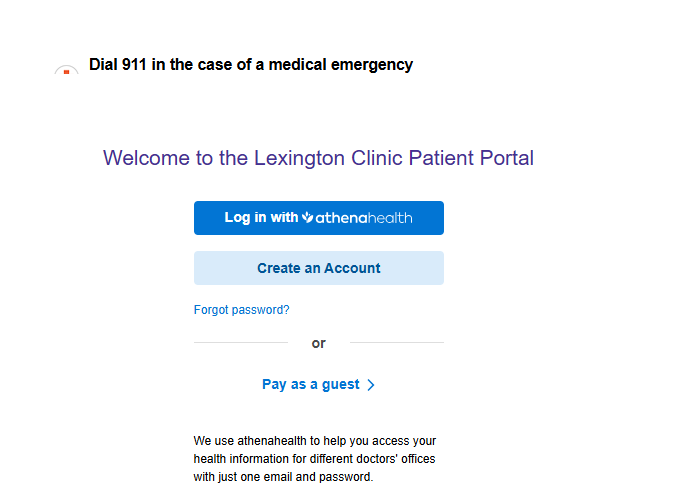
- To log in to your account, copy 13059-1.portal.athenahealth.com to your browser and launch it.
- Click on “Log in with Athena Health”
- Fill in the username and password fields on the page with their respective credentials. After signing in, click on “Manage Your Health Record” to access all of your information available through the portal.
If this is your first login and you don’t have an athenahealth account, refer to your healthcare provider’s instructions. These instructions will guide you on how to register for their patient portal. You will be walked through creating an Athenahealth account as part of that process.
How Do I Access My Medical Records?
If you are a Lexington Clinic patient, you can access your medical records through the Patient Portal login. Log in with Athena Health to view them.
The Patient Portal is a secure website. You can view your health history there. It shows your current medications and contact information for our staff. You can also request copies of your medical records or schedule an appointment.
Lexington Clinic Online Bill Pay
If you aren’t registered for the Patient Portal system, click the Patient Portal link below. You can register by clicking the “Sign Up Today” button on the page
The new Patient Portal system offers lab results sooner, convenient messaging with your provider, and many more enhanced features. You also make payments using the Patient Portal powered by Athena Health.
How to Reset Your Lexington Clinic Patient Portal Password
To reset your Lexington Clinic Patient Portal Password, you must first navigate to the Patient Portal Welcome page. Once there, select the ‘Forgot Password’ link. It is located below the ‘Log in with athenahealth’ button. Follow the directions to reset your password.
Note: The athenahealth account does not distinguish between upper and lowercase letters. You must enter any spaces or special characters included when you created the answer.